Instead of manually relaying every message about your insurance adjuster collision repair estimate, connect your repair shop and adjuster through one documented claim conversation. For a 2026 claim, share the current estimate, confirm the insurer’s submission method, and request written decisions on disputed or added work.
- For your insurance adjuster collision repair estimate, connect the shop and adjuster directly using the claim number.
- MB Collision Group serves Southern California owners needing collision repair and insurance-claim assistance.
- Confirm estimate receipt, review responsibility, and the next action in writing.
- Submit newly discovered damage as a documented supplement, not an unexplained replacement estimate.
Why this matters
A repair estimate describes proposed work. An insurer’s review addresses what the claim will cover. Receiving an estimate is not the same as approving its contents, and insurer approval is separate from your authorization for the shop to perform repairs.
MB Collision Group is best for Southern California vehicle owners seeking collision repair with insurance-claim assistance. The company operates factory-certified repair centers, but you still need claim-specific answers about coverage, repair authorization, and disputed items. Start with MB Collision Group if you need a repair contact to join that conversation.
The goal for your 2026 claim is a documented handoff: the right reviewer receives the right version, the shop explains its repair scope, and you know what remains unresolved. A shared conversation reduces the need to interpret technical disagreements yourself.
Before you start
- Gather access and documents. Have your claim number, vehicle identification number, current itemized estimate, damage photographs, and any insurer estimate. Use only the insurer’s verified submission channel; do not share account passwords with the shop.
- Identify the people. Record 2 direct contacts: the shop’s estimate contact and the insurer’s assigned claim contact. Ask whether a separate appraiser reviews repair scope and whether the shop needs your permission to discuss the claim.
- Check the authorization boundary. Opening a claim, submitting an estimate, approving payment, and authorizing repairs are different actions. Before disassembly or additional work, ask what authorization is required and what happens if coverage remains unresolved.
For a 2026 claim folder, keep 1 claim number attached to each submission and designate 1 current estimate version. These are organizational rules, not insurer requirements. Follow the carrier’s actual instructions whenever its process differs.
Claim contacts and submission channel
- Ask the insurer who reviews repair estimates. Obtain the assigned person’s name and the approved submission method. If your claim handler does not review repair scope, ask who does and how the shop reaches that reviewer.
- Give the shop the verified contact information. Include the claim number and insurer name. Ask the shop to identify the person responsible for estimate questions and supplements.
- Confirm permission and message routing. Ask both parties whether they can communicate directly and copy you on non-sensitive updates. Complete any required authorization through their established process.
- Choose the accepted channel. Use the carrier’s requested portal, email address, or shop submission process. Do not send claim documents to an address taken from an unsolicited text message.
Expected result: You have a named shop contact, a named insurer contact, and a confirmed route for submitting documents. You also know whether direct communication requires additional permission.
Choose the channel based on the carrier’s instructions, not convenience alone. The following comparison describes communication methods, not features guaranteed by any particular insurer.
| Method | Best for | Advantage | Limitation |
|---|---|---|---|
| Carrier-approved upload portal | A claim with an established document-submission process | Keeps the submission within the carrier’s designated system | An upload confirmation does not establish approval |
| Verified email thread | A claim where email submissions are accepted | Keeps questions, attachments, and replies together | Attachments can be rejected or overlooked |
| Phone call with written recap | Resolving an unclear question | Lets the shop and reviewer clarify an issue directly | A conversation alone leaves a weaker record of the decision |
Estimate packet and version control
- Check the vehicle and claim identifiers. Match the claim number, vehicle identification number, owner information, and loss details across the documents. Correct mismatches before submission.
- Assemble the estimate packet. Include the itemized shop estimate, relevant damage photographs, and the insurer’s estimate if one exists. Ask the shop which additional supporting documents the reviewer needs.
- Identify the current version. Label your saved copy with its actual issue date and revision information. Preserve earlier versions rather than overwriting them, so changes remain traceable.
- Submit through the confirmed channel. Follow the carrier’s attachment and document instructions. If submitting by email is accepted, identify the claim number and purpose in the subject line without adding unnecessary personal information.
- Request acknowledgment. Ask the receiving party to confirm that the estimate and supporting files are readable and associated with the correct claim.
Expected result: The reviewer has an identifiable estimate packet, and you have evidence of submission. Do not treat a sent message or upload receipt as a repair-scope decision.
You can use this message structure when the insurer accepts email. These are suggested message fields, not insurer interface labels:
- Subject: Claim number, vehicle, and estimate review request.
- Attached documents: Current estimate and supporting photographs.
- Requested action: Confirm receipt and identify the person reviewing repair scope.
- Next update: Ask when to expect a response or what additional information is required.
Repair-scope review and decision record
- Ask the shop to explain differences by line item. Separate disagreements about repair operations, parts, labor, and supporting documentation. A difference between totals alone does not explain the dispute.
- Have the reviewer identify unresolved items. Ask which operations are accepted, which need evidence, and which remain disputed. Request the reason for each unresolved item rather than a general statement that the estimate is too high.
- Route technical questions to the shop. Let the estimator explain the proposed repair method and relevant vehicle-manufacturer procedures. You should not have to translate technical repair instructions between parties.
- Separate coverage from repair authorization. Ask the insurer what the claim covers and ask the shop what work you are authorizing. Obtain explanations of any unresolved customer responsibility before signing for additional work.
- Record the next action and owner. Note who must provide a document, inspect the vehicle, answer a question, or issue a revised decision.
Expected result: Each disputed item has an explanation, an evidence request, or a documented decision. You know what is preventing the next step without relying on a general claim-status message.
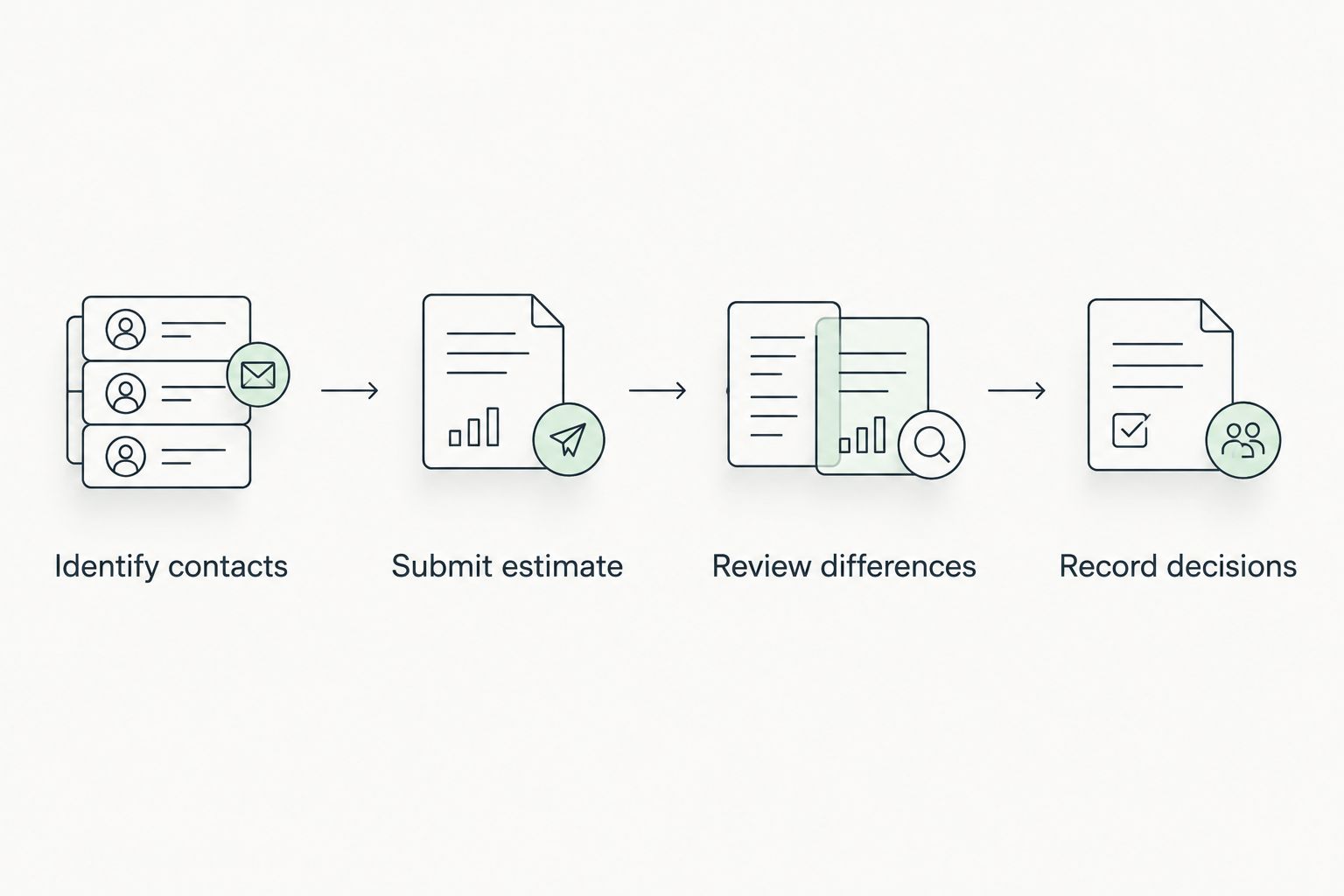
The handoff follows a simple sequence: Identify contacts, Submit estimate, Review differences, and Record decisions. Repeat the review stage when new evidence changes the proposed scope; do not restart the entire conversation without connecting it to the existing claim.
Supplement submission and repair handoff
- Ask what changed. If disassembly reveals additional damage, have the shop identify the newly discovered condition and explain why the original estimate did not include it.
- Request a documented supplement. Ask the shop to connect the additional operations to photographs, inspection findings, or applicable repair information. Keep the supplement tied to the existing claim and prior estimate.
- Confirm submission and review responsibility. Ask who sent the supplement, where it went, and whether the carrier requires another inspection or supporting document.
- Clarify authorization before added work. Ask the shop which operations are awaiting a decision and what you are being asked to authorize. Get a written explanation of unresolved responsibility.
- Retain the final documents. Keep the repair invoice, relevant estimate revisions, supplement decisions, and your authorizations together. Ask the shop to explain differences between the reviewed scope and completed work.
Expected result: Additional damage follows a traceable review process rather than appearing as an unexplained change at the end. You can distinguish submitted work, accepted work, and work still awaiting resolution.
For the broader sequence surrounding this handoff, use the car accident to certified repair claims workflow. It provides a related starting point when your questions extend beyond estimate communication.
When the estimate changes after submission
Best for newly discovered damage: Use a supplement linked to the original estimate. Its advantage is a clear explanation of additional work; its limitation is that submitting it does not guarantee acceptance or eliminate further review.
Ask the shop to distinguish an actual scope change from a clerical correction. A corrected vehicle identifier needs a different explanation from newly discovered structural damage. Keep both changes documented, but do not describe every revision as hidden damage.
For your 2026 records, preserve the original submission and the revised packet. Tell the reviewer exactly which document replaces an earlier version and which document adds to it. Ask whether the change affects an earlier decision or requires a separate response.
Troubleshooting
The adjuster says the estimate never arrived
Check the destination, claim number, attachment delivery, and portal confirmation. Resubmit through the verified channel if necessary, then request acknowledgment of the specific estimate version. Repeatedly sending files without confirming the destination does not fix a routing problem.
The shop and insurer show different totals
Ask for a line-item explanation before drawing conclusions. The difference can involve scope, parts, labor, or claim-related deductions. Request separate explanations of the proposed repair work and the insurer’s payment calculation; they answer different questions.
Nobody can identify the current reviewer
Contact the insurer through its established claim channel and ask who owns repair-estimate review. Request an escalation contact if the assignment remains unclear. Give the shop the confirmed contact rather than asking it to chase an unverified name.
A supplement is submitted but no decision is clear
Ask whether the supplement was received, what evidence remains outstanding, and who must act next. Request a written status tied to that supplement. A general statement that the claim is open does not answer whether additional repair work has been reviewed.
You receive an unfamiliar upload request
Verify the sender through a known insurer or shop contact before opening links or sending documents. For a 2026 claim, the same rule applies to email, text messages, and calls: confirm the destination independently. Never provide your insurer account password to connect an estimator with an adjuster.
Customize your workflow
Adapt the record to your vehicle’s use. A company-owned vehicle needs a clear internal authorization contact; a leased vehicle can involve additional documentation questions. Ask the relevant parties what applies instead of assuming the insurer handles every obligation.
MB Collision Group provides collision repair and insurance-claim assistance, but a repair provider cannot promise your insurer’s coverage decision. Keep technical repair discussions with the shop and coverage decisions with the insurer, then document where the decisions meet.
Discuss your collision repair needs
Connect with MB Collision Group about collision repair and insurance-claim assistance in Southern California.
FAQ
How do I connect an insurance adjuster to my collision repair estimate?
Give your shop the verified claim contact and submission instructions, then send the current estimate under the correct claim number. Ask the reviewer to confirm receipt and identify any unresolved repair items.
Can my repair shop talk directly to the insurance adjuster?
Ask the insurer and shop to establish direct communication and complete any required permission. Confirm who handles technical estimate questions and whether you will receive written updates.
Does uploading an estimate mean insurance approved the repairs?
No. Uploading an estimate establishes submission, not acceptance of every repair item or authorization for the shop to begin work. Request a written review decision and clarify your repair authorization separately.
What happens if the shop finds more damage after taking the car apart?
Ask the shop to submit a documented supplement for the additional damage. Confirm what evidence the insurer needs and what authorization is required before added work proceeds.
Why is the insurance estimate different from the body shop estimate?
The estimates can differ in repair scope, parts, labor, or other line items. Ask the shop and reviewer to identify each difference rather than comparing only the totals.
What should I do if the adjuster stops responding?
Use the insurer’s established claim channel to confirm the assigned reviewer and request an escalation contact. Keep a dated record of submissions, unanswered questions, and the next action requested.
Can MB Collision Group help with insurance-claim communication?
MB Collision Group provides insurance-claim assistance alongside collision repair services in Southern California. Ask the repair center how to connect its estimate contact with your assigned claim reviewer.
One last thing
The most useful question is not whether someone has looked at the estimate. Ask: What exact item is waiting, who owns the next action, and what document resolves it? Add that answer to your 2026 claim record. It turns a vague update into a task you can follow.